AI Art Print Mockups: Photograph and Mock Up Your Prints
An AI-generated image is finished the moment the file renders, but it is not ready to sell until a buyer can picture it on a wall. A flat square on a white background tells a shopper nothing about scale, paper texture, or the way a frame changes the mood of a room. That gap between the file and the physical object is where mockups and good photography earn their keep.
Both halves of the job matter. You can build convincing AI art print mockups from a digital file in minutes, and you can photograph a real print when one is in your hands. They feed the same listing, and they need the same discipline about colour, scale and honesty. Here is how I approach each part for the GeDesPi shop listings that point buyers to ArtPal and Fine Art America.
Why mockups do more than decorate a listing
A mockup is a sales argument. It answers the questions a buyer would ask if the print were hanging in a gallery: how big is it, what does the frame do to the colours, does it suit a living room or a hallway, and does the paper look matte or glossy. A studio shot against a plain wall serves one set of shoppers. A room scene with a sofa, a plant and a rug serves another.
The commercial case is not just my impression. Prodigi sells its mockup service on exactly that basis, promising to “boost your print on demand sales with realistic product mockups” and stating that its 3D previews are shot from multiple angles so products look their best even before they are printed. Placeit makes a similar pitch, describing itself as the largest free mockup library online and offering a dedicated Art Print category with around 800 templates. Buyers respond to context, and mockups supply it cheaply.
Photographing a real print: a simple setup
When the physical print exists, a photograph carries information a digital mockup cannot fake. You get the actual paper stock, the actual ink, the actual sheen across the surface. It is worth taking the time to get it right rather than relying on a stock frame for every listing.
Light first, then everything else
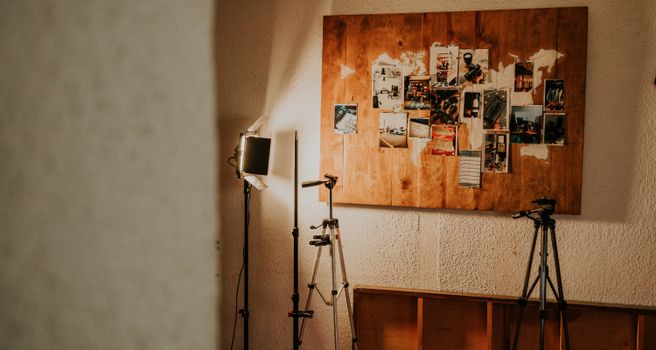
Soft, even daylight is the easiest light to work with and the easiest to correct afterwards. A window with bright sun bouncing off a wall will flatten texture and blow out the highlights, so diffuse light that comes in from one side and stays consistent across the whole frame. A tripod removes the small handheld wobble that becomes obvious on thin borders, and a camera positioned square to the print keeps the rectangle rectangular instead of a trapezoid.
Shoot each piece at least twice: once as a straight-on record for the customer who wants detail, and once slightly to the side so the surface texture and the depth of a frame read. If the print is behind glass, angle the camera slightly to avoid catching your own reflection, or take the artwork out of the glazing for the shot.
Colour and edge accuracy
Colour drift is the fastest way to earn a return. The buyer expects the deep blue they saw in the listing, not a washed-out version. Keep a neutral reference in shot for the first frame, judge the result on a calibrated screen rather than a phone at full brightness, and correct white balance before touching contrast. A slightly flat image is safer than a punchy one that misrepresents the print.
Give the edges room. Leave a margin around the whole sheet so the crop does not slice into the border, and make sure the entire edge of the paper is visible. In AI-assisted work, small artefacts and fine gradients are often the first things lost to a careless crop or heavy sharpening.
Props that do not steal attention
Props should describe the room, not compete with the artwork. A chair, a table, a shade, a plant, a rug corner. Avoid strong patterns, saturated colours near the print, and anything with legible text or a recognisable logo. If the artwork is muted and minimal, the room should be too. If it is loud, keep everything else quiet.
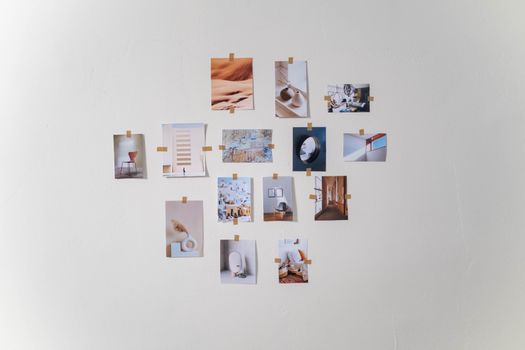
Building mockups from the flat file
Many AI art prints sell before a single copy is physically produced, which makes digital mockups essential rather than optional. There are two routes: template libraries that place your file inside a prepared scene, and generators that build the scene for you.
Template libraries versus AI generation
Template tools work by swapping your image into a predefined frame or wall, so the result is predictable and quick once you find scenes that suit your catalogue. Mockey, for example, offers a free online mockup generator with more than 30,000 mockup templates covering categories such as t-shirts, hoodies, business cards and stickers. Placeit’s Art Print category is more directly aimed at wall goods. Consistency across a series is simple: pick one scene, one frame style and one crop, then apply them to every print in the collection.
AI mockup generators take a different approach. Canva’s tool advertises realistic AI-generated mockups of t-shirts, websites and posters in one click, and Kittl’s mockup generator lets you upload a logo, illustration, graphic or product design and see how it looks on a product. The trade-off is variety and speed against a little less control over the exact placement.
For wall art specifically, FreeMockup.ai offers free wall art mockups powered by AI with no watermark, and Etsy UK carries a range of AI frame mockups sold as digital downloads by independent sellers. Adobe Stock adds another option: royalty-free art mockup stock images and footage that can serve as backdrops, texture plates or reference for a composite.
Matching the frame to the artwork
The frame is part of the design decision, even when you are only selling the print. A heavy black frame on a delicate pastel piece changes what the buyer thinks they are purchasing. Offer a small, consistent set of frame styles across the shop, and use the same frame for the same print wherever it appears: listing image, social post, portfolio page. Familiarity builds recognition, and recognition shortens the decision.
Comparing the main mockup options
| Tool or source | What the research describes | Where it fits in a shop |
|---|---|---|
| Mockey | Free online mockup generator with more than 30,000 templates across product categories | Wide template choice when you sell more than prints |
| Canva | AI mockup generator producing t-shirts, websites and posters in one click | Fast one-click scenes for quick listings |
| Placeit | Free mockup library with a dedicated Art Print category of around 800 templates | Building a consistent set of print listing images |
| Kittl | Upload a design and preview it on a product | Checking a design reads well once framed |
| Prodigi | 3D print-on-demand mockups shot from multiple angles | Realism for prints you also fulfil as products |
| FreeMockup.ai | Free AI wall art mockups with no watermark | Wall scenes at no cost |
| Adobe Stock | Royalty-free art mockup stock images and HD footage | Backdrops and reference for composites |
Check the current licence terms on each service before you publish, particularly where a free tier is involved. Terms change, and a mockup that is fine for a portfolio page may not be acceptable on a commercial listing. Confirm the details with the tool itself rather than assuming.
A repeatable workflow for each listing
- Export the final file at the largest size the platform will accept, then keep a clean master that is never cropped or sharpened.
- Decide the frame and the room style once for the collection, so all the prints look like they belong together.
- Produce a straight-on view for detail, a room scene for context, and a close crop that shows texture or brushwork.
- Photograph the real print if one exists, and use that image alongside the mockup rather than replacing it.
- Check colour against the master file, then check it again on a phone screen, because that is where most shoppers will see it.
- Label anything that is a simulation, and state clearly what the buyer receives: the print, the frame, or both.
- Repeat the same order for every listing so the shop reads as a coherent collection rather than a jumble.

Honesty, labelling and buyer trust
A mockup is a promise about what will arrive in the post. If the frame in the picture is not included, say so plainly in the listing text. If the print is shown on a wall at a size it is not sold in, make the sizes visible. Review platforms have their own listing rules, so check the current guidance on the platform you sell through before publishing anything borderline.
The good news is that honest mockups sell better than flattering ones. A buyer who receives exactly what the picture promised leaves a good review, and a good review does more for a shop than any single image. Photograph the real print when you can, mock up the rest with care, and make the words match the picture.
Frequently Asked Questions
Can I use free mockup tools for prints I am selling?
Sometimes, but the licence matters more than the price. Free tools such as Mockey, Placeit and FreeMockup.ai all advertise free mockup creation, yet each sets its own terms for commercial use. Read the current licence before you publish a listing, and keep a note of which tool produced which image so you can check again later if the terms change.
How many mockup images should a print listing have?
There is no fixed number, but a listing usually needs enough images to answer the obvious questions. A straight-on view shows the whole design, a room scene shows scale, a close crop shows texture, and a frame detail shows finish. Cover those four jobs and the buyer has what they need to decide without asking you directly.
Should I say that an image is a mockup?
Yes, where there is any chance of confusion. A clearly worded line in the description costs nothing and prevents the disappointment of a buyer who expected a frame that was never part of the sale. Check the listing rules on the platform you sell through, since some marketplaces have their own requirements for how product images are represented.
Do I still need real photographs if I have good mockups?
Real photographs remain the strongest proof that the print exists. A mockup shows how a design might look on a wall, while a photograph shows the paper, the ink and the finish as they actually are. Use both: mockups for the shop grid and lifestyle context, real photographs for close detail and buyer confidence.
Which mockup style suits AI art prints best?
Minimal rooms tend to work hardest for AI-generated work. Fine gradients, soft colour transitions and small artefacts are easily swamped by busy props or strong patterns, so keep the scene quiet and let the artwork hold the frame. A simple wall, one piece of furniture and natural light will flatter almost any print in a catalogue.